


By Yiddy Lemmer, CEO – CompuConnect, Inc.
Endpoint detection and response, commonly called EDR, is cybersecurity software that continuously watches business computers and other connected devices for suspicious activity.
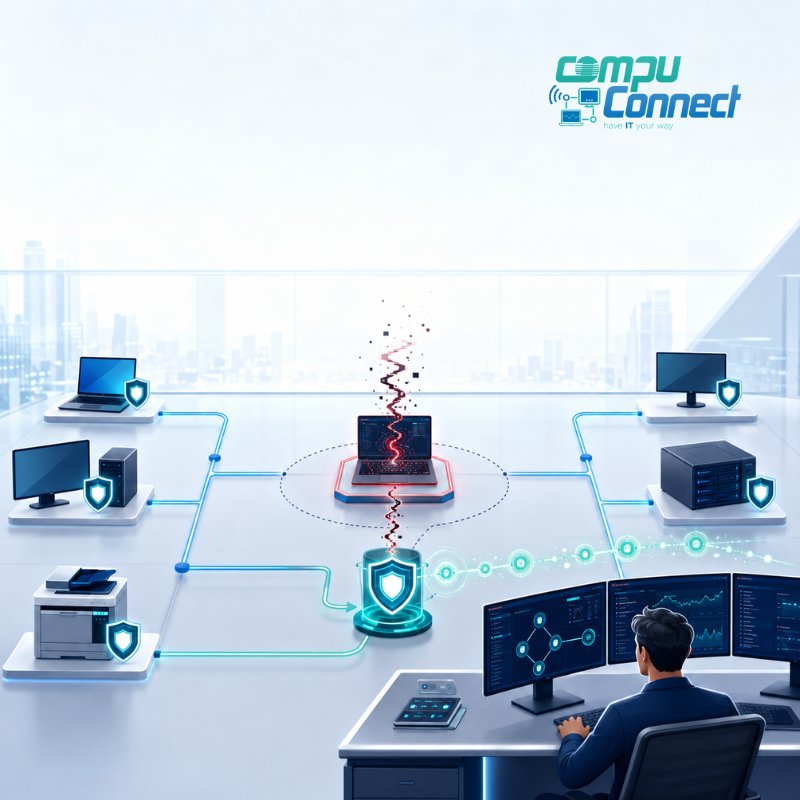
In plain English, EDR acts like a security camera and response system for your company’s devices. It looks for unusual behavior, records what happened, alerts the people responsible for cybersecurity, and may automatically contain a threat before it spreads.
Traditional antivirus mainly tries to block known malicious files. EDR goes further by examining what programs, users, and devices are doing. This can help identify ransomware, compromised accounts, malicious scripts, and other threats that may not look like a traditional computer virus.
What Does “Endpoint” Mean?
An endpoint is a device that connects to your business network or accesses company information.
Common endpoints include:
- Desktop computers
- Laptops
- Servers
- Mobile devices
- Virtual machines
- Remote work devices
These devices are often where employees open email, access cloud applications, download documents, and work with sensitive business information.
That makes endpoints a common entry point for cyber threats. A malicious email attachment, stolen login, unsafe download, or compromised application can give an attacker an opportunity to enter the business through an employee’s device.
EDR helps provide visibility into what is happening on those devices so suspicious behavior can be investigated and addressed.
How Does EDR Work?
EDR usually performs four basic functions:
- It watches activity.
- It identifies suspicious behavior.
- It helps investigate what happened.
- It supports or automates a response.
1. EDR Watches Device Activity
EDR software runs in the background on protected computers and servers.
It may monitor activity such as:
- Programs being opened
- Files being created or changed
- User login activity
- Network connections
- Software behavior
- System changes
- Attempts to access protected resources
The goal is not to read every document an employee creates. The goal is to identify technical behavior that may indicate a security problem.
Microsoft describes EDR as providing visibility into endpoint activity so security teams can detect, investigate, and respond to advanced attacks.
2. EDR Looks for Suspicious Behavior
A cyber threat does not always arrive as an obviously infected file.
An attacker may use legitimate tools already installed on a computer. A compromised account may suddenly access unusual files. A program may begin encrypting documents, changing system settings, or connecting to an unfamiliar destination.
EDR looks at patterns of behavior rather than relying only on a list of known viruses.
For example, EDR may flag a situation where:
- A user account signs in and immediately accesses an unusual number of files
- A program starts changing hundreds of documents
- A device communicates with a suspicious external server
- An unfamiliar script attempts to disable security tools
- One computer begins trying to connect to several other devices
- A program behaves differently from the way it normally does
Each individual action may not prove that an attack is taking place. EDR provides the information needed to connect those actions and determine whether they represent a real threat.
3. EDR Helps Investigate the Incident
When EDR identifies suspicious activity, it creates an alert for the security team or managed IT provider.
The alert may show:
- Which device was involved
- Which user was signed in
- Which program started the activity
- Which files were affected
- When the activity began
- Whether other devices were involved
- What happened before and after the alert
- Which response actions are available
This history helps the person investigating understand the scope of the problem.
Instead of knowing only that “a virus was found,” the security team may be able to see how the activity started, what it touched, whether it spread, and what needs to be addressed.
Microsoft notes that EDR alerts can be grouped into incidents, helping analysts investigate connected activity and respond more effectively.
4. EDR Helps Contain the Threat
Depending on the product and configuration, EDR may automatically take action or allow a security professional to respond quickly.
Possible response actions include:
- Isolating a computer from the network
- Stopping a malicious process
- Quarantining a suspicious file
- Blocking known malicious activity
- Running a security scan
- Collecting additional information
- Removing or containing the threat
Isolating a device does not necessarily mean turning it off. It may mean temporarily preventing the device from communicating with other business systems while allowing the security team to investigate.
This can help limit the damage if one computer has been compromised. Microsoft’s documented EDR response capabilities include actions such as isolating devices and stopping or quarantining files.
A Simple EDR Example
Imagine an employee receives an email that appears to come from a trusted vendor.
The employee opens an attachment. Nothing obvious happens, so the employee continues working.
In the background, however, the attachment launches a script that begins:
- Collecting saved credentials
- Connecting to an unfamiliar server
- Attempting to disable security tools
- Searching for shared company files
Basic antivirus may block the file if it already recognizes it as malicious. If the file is new, modified, or using legitimate system tools, the activity may be harder to identify through traditional file scanning alone.
EDR may detect the unusual chain of behavior, create an alert, stop the process, and isolate the computer. The security team can then investigate whether any credentials or other devices were affected.
EDR does not guarantee that every attack will be stopped. It gives the business better visibility and response capabilities when suspicious activity occurs.
What Is the Difference Between EDR and Antivirus?
Antivirus and EDR both help protect devices, but they are not exactly the same.
| Antivirus | Endpoint Detection and Response |
|---|---|
| Primarily focuses on preventing and removing malware | Focuses on detection, investigation, and response |
| Often looks for known malicious files or patterns | Examines device activity and behavior |
| May remove or quarantine an infected file | May show how the activity began and what else was affected |
| Usually provides a limited view of the incident | Provides deeper information for investigation |
| Often responds to an individual file | Can connect multiple actions into a larger incident |
| May be managed directly on the device | Is commonly managed through a centralized security platform |
Modern endpoint security products often combine antivirus and EDR capabilities. It is therefore important to review the actual features of the product rather than relying only on the name used in a proposal.
Microsoft Defender for Endpoint, for example, combines preventative protection with endpoint detection, automated investigation, and response capabilities.
A helpful comparison is:
Antivirus checks whether something looks known and dangerous. EDR also watches what it does.
Does EDR Replace Antivirus?
Not necessarily.
EDR is usually part of a layered endpoint security strategy. Depending on the platform, antivirus may be built into the same product or operate alongside it.
A complete business cybersecurity program may also include:
- Multi-factor authentication
- Email security
- Patch management
- Security awareness training
- Protected backups
- Microsoft 365 security
- Firewall management
- Access controls
- Vulnerability management
- Incident response planning
- Ongoing security monitoring
EDR protects an important part of the environment, but it does not replace every other cybersecurity safeguard.
For example, EDR cannot prevent an employee from approving a fraudulent wire transfer simply because a convincing email reached the inbox. It also cannot replace secure backups, employee training, access management, or a documented response plan.
What Is the Difference Between EDR, MDR, and XDR?
These abbreviations are often used together, but they describe different things.
EDR: Endpoint Detection and Response
EDR is the technology that monitors and responds to suspicious activity on endpoints such as laptops, desktops, and servers.
MDR: Managed Detection and Response
Managed detection and response, or MDR, is a service in which security professionals monitor alerts, investigate suspicious activity, and help respond to threats.
A business may own an EDR platform but use an MDR provider to monitor it.
The simplest distinction is:
EDR is the technology. MDR is the people and service helping manage the technology.
Some EDR tools can automate portions of the response, but businesses still need to determine who will review alerts, investigate incidents, make decisions, and communicate with leadership.
XDR: Extended Detection and Response
Extended detection and response, or XDR, combines information from several security areas.
Depending on the platform, this may include:
- Endpoints
- User identities
- Cloud applications
- Servers
- Network activity
The purpose is to provide a broader view of an incident.
For example, XDR may connect a suspicious email with a compromised login and unusual activity on an employee’s laptop. EDR focuses primarily on the endpoint portion of that activity.
Why Is EDR Important for Businesses?
Business devices contain or provide access to valuable information.
Depending on the organization, that information may include:
- Financial records
- Tax information
- Employee information
- Customer records
- Protected health information
- Cloud applications
- Bank information
- Contracts
- Intellectual property
- Administrative credentials
A single compromised laptop may provide access to much more than the information stored directly on that device.
It could provide a pathway into:
- Microsoft 365
- Shared folders
- Cloud platforms
- Accounting applications
- Administrative systems
- Remote access tools
- Other computers on the network
EDR can help identify suspicious activity earlier, provide information for an investigation, and limit the ability of a threat to spread.
CISA includes endpoint detection and response among the defensive measures organizations should consider for detecting and responding to ransomware and other malicious activity.
Which Businesses Should Consider EDR?
EDR can benefit many organizations, but it is especially important for businesses that:
- Maintain sensitive customer or employee information
- Operate in a regulated industry
- Depend heavily on computers and cloud applications
- Have remote or hybrid employees
- Use several locations
- Cannot tolerate extended downtime
- Need stronger cybersecurity controls for insurance
- Have limited internal cybersecurity staff
- Manage financial, tax, healthcare, or confidential business data
CPA firms, financial businesses, home healthcare agencies, law firms, professional service organizations, and other data-sensitive businesses may need more than traditional antivirus.
The appropriate solution should be based on the organization’s data, systems, risks, insurance requirements, contractual responsibilities, and operational needs.
Does EDR Work Automatically?
Some parts can be automated, but EDR should not be treated as a completely hands-off security product.
An EDR platform may automatically:
- Block certain activity
- Quarantine files
- Stop malicious processes
- Isolate devices
- Group related alerts
- Collect information for an investigation
However, someone still needs to:
- Review important alerts
- Determine whether the activity is legitimate
- Investigate the affected systems
- Confirm whether the threat spread
- Restore normal access
- Reset affected credentials
- Communicate with business leadership
- Document the incident
- Coordinate the broader response
Without proper monitoring, an EDR tool may generate useful alerts that no one reviews promptly.
A business should know exactly who is responsible for watching the platform and responding when a serious alert appears.
Is EDR the Same as 24/7 Cybersecurity Monitoring?
No.
Installing an EDR product does not automatically mean that trained professionals are monitoring it around the clock.
A proposal should clearly explain:
- Who receives alerts
- When alerts are monitored
- Whether monitoring is provided 24/7
- Who investigates suspicious activity
- What actions the provider can take
- Whether incident response is included
- How business leadership will be notified
- What happens after a device is isolated
- Which services cost extra
The software, monitoring service, managed IT support, and formal incident response may be separate parts of the cybersecurity program.
Can EDR Stop Ransomware?
EDR can help detect and contain behavior associated with ransomware, but no cybersecurity product can guarantee that ransomware will never affect a business.
An EDR platform may recognize behavior such as rapid file encryption, suspicious scripts, attempts to disable security tools, or unusual connections between devices. It may then stop the activity or isolate the affected computer.
CISA recommends using endpoint detection and response or similar controls as part of a broader ransomware defense strategy.
Businesses still need other safeguards, including:
- Protected and tested backups
- Multi-factor authentication
- Email protection
- Timely software updates
- Employee training
- Limited administrative access
- Network security
- Incident response planning
- Business continuity planning
EDR is one layer of protection, not a complete ransomware strategy by itself.
What Should a Business Ask About an EDR Solution?
Before purchasing EDR or comparing managed cybersecurity proposals, ask:
Which devices are covered?
Confirm whether the solution protects:
- Windows computers
- Mac computers
- Servers
- Mobile devices
- Remote computers
- Virtual machines
Who monitors the alerts?
Determine whether alerts go to:
- An internal employee
- The managed IT provider
- A dedicated security operations team
- An MDR provider
- No one unless the business checks the dashboard
What happens when a threat is detected?
Ask whether the provider can:
- Isolate a device
- Stop a process
- Quarantine a file
- Investigate the incident
- Reset credentials
- Search other devices
- Contact business leadership
- Coordinate recovery
Is monitoring available outside business hours?
Cybersecurity incidents do not always occur between 9:00 AM and 5:00 PM.
Confirm whether the service includes continuous monitoring or only software alerts.
Is incident response included?
Alert monitoring and incident response are not always the same service.
Ask what happens after a real compromise is confirmed and which activities may be billed separately.
How is EDR managed?
The provider should explain:
- How policies are configured
- How devices are added and removed
- How alerts are reviewed
- How false alarms are handled
- How security reports are provided
- How the platform fits with email, identity, backup, and cloud security
What EDR Cannot Do by Itself
EDR is valuable, but it does not solve every cybersecurity problem.
EDR alone cannot:
- Train employees to recognize social engineering
- Secure every cloud application
- Replace multi-factor authentication
- Create reliable backups
- Write an incident response plan
- Eliminate weak passwords
- Manage employee access
- Correct every software vulnerability
- Guarantee compliance
- Guarantee that a cyber incident will never occur
The strongest cybersecurity programs combine technology, monitoring, policies, employee training, planning, and responsive human support.
How CompuConnect Approaches Endpoint Security
CompuConnect helps small and midsize businesses build endpoint security into a broader managed IT and cybersecurity strategy.
That strategy may include:
- Endpoint protection
- EDR evaluation and management
- Email security
- Multi-factor authentication
- Microsoft 365 security
- Patch management
- Backup and recovery
- Proactive monitoring
- Security awareness training
- Access management
- Incident response planning
- Strategic cybersecurity reviews
The goal is not simply to install another security application.
The goal is to create a stable, managed environment in which devices are protected, alerts have clear ownership, suspicious activity receives attention, and business leaders understand what happens when a threat is detected.
CompuConnect provides proactive managed IT services and cybersecurity support for CPA firms, financial businesses, home healthcare agencies, professional service firms, and other organizations throughout Brooklyn, Manhattan, New York City, Brick, South Jersey, and the Tri-State Area.
Clients also receive 100% live human support. When someone calls during business hours, a live receptionist connects the caller with the appropriate technician rather than requiring the employee to begin with a chatbot or automated support gatekeeper.
Frequently Asked Questions About EDR
What does EDR stand for?
EDR stands for endpoint detection and response.
It is cybersecurity technology used to monitor endpoints, identify suspicious activity, support investigations, and respond to potential threats.
Is EDR software installed on every computer?
EDR usually requires a software agent or sensor on each protected device. The exact installation and management process depends on the product.
Businesses should confirm that all eligible devices are enrolled and reporting properly. A purchased license does not protect a device that was never correctly connected to the platform.
Does Microsoft 365 include EDR?
Some Microsoft business and enterprise security plans include Microsoft Defender endpoint capabilities, while others do not include the same level of protection.
Licensing and features change, so businesses should verify the exact Microsoft plan, endpoint product, configuration, and monitoring service included in their agreement.
Is Windows Defender the same as EDR?
The basic security built into Windows should not automatically be assumed to provide the same capabilities as a fully configured and managed EDR platform.
Microsoft offers several security products and licensing levels. The business should confirm which Defender product is installed, which features are active, and who monitors the alerts.
Will employees notice EDR running?
A properly configured EDR product usually operates in the background. Employees may notice it when a file is blocked, a device is isolated, or the security team needs to investigate activity.
The specific effect on performance depends on the product, device condition, and configuration.
Is EDR only for large companies?
No.
Small and midsize businesses also rely on laptops, cloud applications, email, financial platforms, and sensitive information. EDR may be particularly valuable when a company does not have a large internal cybersecurity team.
How much does EDR cost?
EDR pricing depends on the product, number and type of devices, licensing plan, monitoring level, response service, and whether it is included in a managed IT or MDR agreement.
Businesses should compare the total service rather than the software license alone. A low-cost product that no one monitors may provide less practical value than a properly managed solution with clear response procedures.
EDR Is More Than Advanced Antivirus
Endpoint detection and response helps a business see what is happening on its computers, identify suspicious behavior, investigate incidents, and respond before a threat causes greater disruption.
The simplest explanation is:
Antivirus looks for known bad files. EDR watches for dangerous behavior and helps someone respond.
EDR works best as part of a broader cybersecurity plan supported by proactive monitoring, secure backups, identity protection, employee training, documented procedures, and real people who know what to do when an alert appears.
CompuConnect helps businesses evaluate endpoint security and build practical cybersecurity plans around their operations, risks, compliance responsibilities, and business continuity needs.
Schedule a cybersecurity assessment with CompuConnect to review your current endpoint protection, identify potential gaps, and clarify who is responsible for monitoring and responding to security alerts.
About the Author
 Yiddy Lemmer is the Founder and CEO of CompuConnect IT, a leading IT support and cybersecurity firm serving small and midsize businesses across New York and New Jersey. With over 18 years of hands-on experience, multiple Microsoft and CompTIA certifications, and deep roots in Brooklyn, Yiddy leads with a passion for technology, service excellence, and helping businesses thrive through secure and efficient IT systems.